

Follow us on:



Mow full corridors in permanent crops. Find and line up a Burro by looking at a map instead of a status screen. Skip a stop without rebuilding the mission. And let your implements switch themselves on and off at the row ends.
What's new with Burro 6.44?
This one came out of watching people work. Walking out to a Burro and working out which way it's facing shouldn't take longer than the job — so there's a map now. Changing your mind about one stop shouldn't mean rebuilding the whole mission — so you can skip it. And your implements shouldn't need a script wrapped around GPS coordinates to know they're in a row — so the Burro just tells them. Here's the release.
✨ New Features
Minimap & Active Route
Line your Burro up by looking at it, not working it out
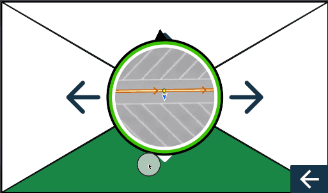
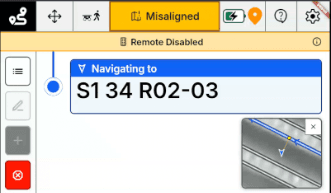
You walk out to a Burro parked mid-yard and have to work out which way it's facing, which route it belongs on, and which end of that route it should start from. The Minimap puts a map view right on the manual control and task screens.
What you see
Heading. Which way the Burro is pointed, at a glance.
Route & network. The path under the Burro and the route or network around it.
Path direction. Which way the path runs, so you line up on the right end the first time.
⭐️ Improvements
In the Rows 🌿
More of the row-to-row work we started in 6.43, this time for permanent crops.
Mow the full corridor, not a line down the middle. Multi-pass routes are spaced to your implement. Set the width once in BOSS Web and the passes come out right.
Skip the row you're not working. Disable a row during route generation. No redrawing the block around it.
Your implement knows when it's in the row. Your Burro now publishes whether it's inside a row, so a third-party implement can switch itself on and off at the row ends. No scripting around GPS coordinates. This is the piece we said was coming in 6.44.
Blocks that aren't neat rectangles. Irregularly shaped blocks, and rows that don't run parallel, used to fail route generation outright. They generate now.
Holds center through the thin spots. Canopy that's heavy on one side and patchy in others used to pull a Burro off center mid-pass. Centering is steadier across the board.
Fewer Stops in the Yard 🚧
The first round of a broader overhaul of how Burros handle what's in their way.
A blocked station doesn't stop the run. Turn on "Avoid Around Stations" and your Burro plans around a station that's covered or backed up against an obstacle, instead of pulling up on it and waiting for you.
Something in the way mid-turn. A cart or a pallet appearing partway through a tight turn used to leave a Burro stuck. It routes around now.
Hand control back and it picks up cleanly. Burros rejoin their route more smoothly after you're done driving.
A paused Burro gets going again. Coming out of a pause, a Burro could see obstacles that weren't there and refuse to move. Fixed.
Plans Change ⚙️
Your day doesn't run the way you planned it at 6am. Neither should your missions.
Skip a stop without rebuilding the mission. Mark any destination or route in the task list Skip Next to pass it once, or Skip Always to keep passing it. Run A → B and then A → C without walking back through task selection.
Know how far along a mow is. Mowing missions now show their progress on screen.
No more parking at a station. A Burro in Harvest Assist could pull up at a station and never move on. That's fixed.
Cycle Routes are still there after a restart. No setting them up twice.
New for August: a fresh splash screen, and the crew who built this release.
🤝 Need a Hand?
Our customer success and support teams are always ready to help. For questions, feedback, or assistance, reach us anytime at support@burro.ai.

Andrew Edzenga